Seating Chart Guide: Plan Perfect Guest Arrivals in 2026
Picture your guests walking in. Music is playing, the room glows, and everyone knows exactly where to go. That first minute sets the tone for the whole night, and a well-planned seating chart is what makes it happen.
This guide walks you through the whole process, from the first RSVP to the last-minute swap. It works for weddings, milestone birthdays and corporate galas alike.
What Is a Seating Chart (and Why It Matters)
A seating chart is the diagram or display that shows which guest sits where. It can be a framed sign, a wall of escort cards or an interactive screen. It tells each person their table, and sometimes their exact seat, before they've taken off a coat.
Why it's worth the effort:
- Smooth arrivals: guests find their spot in seconds instead of circling the room.
- Better mingling: friends, cousins and colleagues land next to people they'll genuinely enjoy.
- Less stress for you: you aren't fielding "where am I sitting?" while you try to greet people.
A thoughtful chart quietly tells every guest they were expected, and that care is what people remember long after the cake is gone.
Types of Seating Charts: Printed, Escort Cards and Digital
Each format changes how guests experience arrival, and how easily you can adjust when plans shift. Here's how the main options compare.
Classic Printed Signs and Escort Cards
Printed charts are the familiar choice: a large sign listing names by table, or individual escort cards laid out alphabetically.
- Printed sign: one focal point, easy to style, but guests crowd around it and read tiny names over each other's shoulders.
- Escort cards: each guest picks up a card with their table, which feels personal and spreads out the foot traffic. Someone still has to set them out and alphabetize them, and a single missing card can cause a small scramble.
Both look lovely, and both are fixed once printed. If a guest cancels or a cousin turns up with a plus-one, you're reprinting or crossing out names by hand.
Digital Seating Charts: The Modern Upgrade
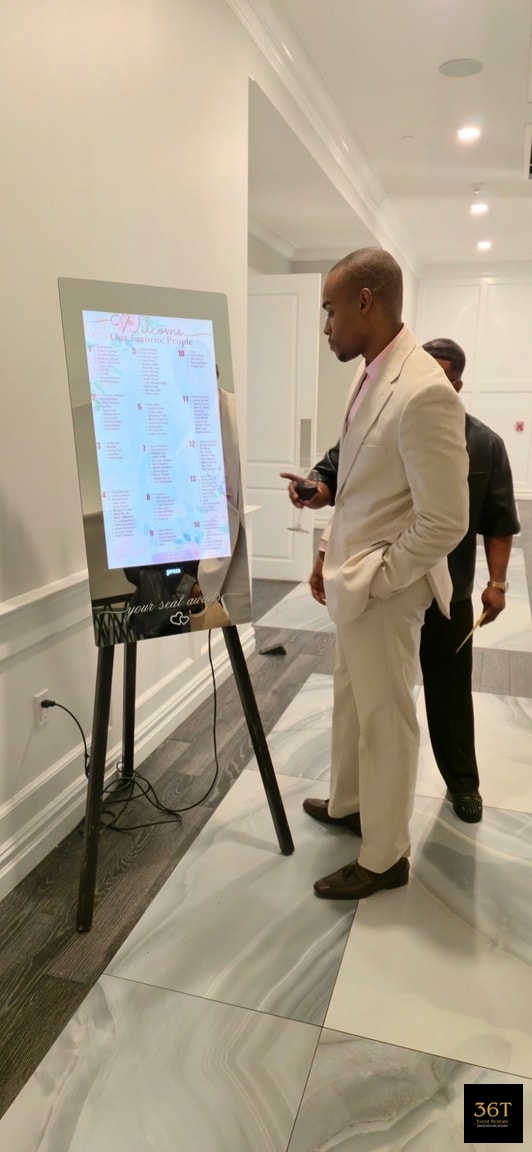
A digital seating chart is an interactive touchscreen. Guests type in their name and see their table right away. There's no crowd around a poster and no hunting through a stack of cards.
It also bends with your event. Because the display is digital, a late change is an update rather than a reprint, which is a big relief on a day when every minute counts. You can read more about how the digital seating chart for events works for guest check-in, or go straight to the page to rent a digital seating chart.
It isn't for everyone. A small dinner for twenty with handwritten place cards probably doesn't need a screen. Digital earns its place when you have a larger crowd, a busy entrance or a host who wants arrivals to feel effortless.
How to Make a Seating Chart, Step by Step
You don't need a design degree, just a clear order of operations. Follow these four steps and the puzzle comes together.
Start With the Guest List and Final RSVPs
Seating is a guessing game until your headcount is real. Wait for the RSVP deadline to pass, then confirm who's actually coming, including plus-ones and children.
Event planners generally advise finalizing the chart only after that deadline, with a short buffer left open for late changes. Our phase-by-phase event planning checklist shows where seating fits in the bigger timeline.
Map Tables and Choose Shapes
Next, look at the room itself. Get the floor plan from your venue, note the dance floor, bar, buffet, stage and exits, and measure how many tables fit with comfortable walking space between them.
Then pick your shapes:
- Round tables: great for conversation, since everyone can see and hear each other.
- Rectangular tables: make better use of long, narrow rooms and suit a more formal, banquet feel.
- A mix: a long head table with rounds for everyone else is a common, flexible combination.
Check how many chairs each table really seats before you plan around it. A table listed for ten may feel cramped with ten, so ask your venue for the true comfortable number.
Group Guests and Assign Seats
Start with relationships, not names. Sort your list into natural clusters: family sides, college friends, coworkers, neighbors. Then fill tables cluster by cluster and sprinkle in a few bridge guests who know people in two groups.
Here's a sample wedding layout showing the method in action:
- Round tables of college friends near the dance floor.
- Two tables for each side of the family, close to the couple.
- A coworkers' table with people who already get along.
- A separate kids' table with a parent seated nearby.
Once the tables feel right, assign individual seats only if you need them, such as at a formal dinner. Otherwise, table-level assignments give guests a little freedom and give you fewer puzzle pieces.
Lock It In Before the Event
Read through the chart once more, slowly. Look for anyone seated apart from their partner, someone placed beside a speaker, or a table where nobody knows anyone.
Then share the final version with your venue, caterer and any vendors who need it. Keep a short buffer for last-minute changes, because a no-show or a surprise addition is nearly guaranteed at a large event.
Seating Chart Etiquette and Tricky Guest Situations
Almost every guest list has at least one delicate situation. A little empathy up front keeps the night joyful for everyone, and you can solve most of these quietly with smart placement.
Family Dynamics and Divorced Parents
When parents are divorced, give each a prominent table near the couple or guest of honor, and keep them at separate tables if tension is possible. Seat each parent with their own family and close friends so nobody feels stranded.
If family relationships are complicated, don't force a reunion at a single table. Distance in the room can be a gift to everyone involved.
Kids, Plus-Ones and Singles
Children are happiest with other children, ideally near their parents. A kids' table with activities keeps them busy while adults enjoy dinner.
Seat plus-ones next to their partner, never off at a distant table. For singles, build tables of mixed friends rather than a "singles table," which can feel awkward. Place them with people who share interests and good conversation.
VIPs, Accessibility and Dietary Needs
Plan for comfort first, and prestige second.
- Elders and grandparents: seat them away from loud speakers and close to restrooms, but not right beside the door.
- Wheelchair users and guests with limited mobility: choose spots with wide, clear paths and enough room at the table, so nobody has to squeeze past chairs.
- Dietary needs: if your caterer needs to know who has allergies or special meals, make sure table numbers match the meal list.
- Corporate VIPs: place executives, honored guests and key clients at prominent tables near the stage, and seat each with a host who can make them feel welcome.
A sweetheart table or head table should have a good view of the room and easy access for photos. It shouldn't be so far from the action that the couple feels isolated.
Seating Chart Ideas by Event Type
Your seating chart can be part of the show. Here are ideas that turn a practical tool into a design moment.
Weddings
- Themed signage that echoes your invitations, florals or color palette.
- A custom backdrop behind the chart so guests can snap a photo as they find their table.
- Table names with meaning, like favorite places, songs or travel destinations.
For more ways to wow guests, see our wedding entertainment ideas.
Sweet 16s, Quinceañeras and Bat Mitzvahs
- A youth-table zone close to the dance floor, with family tables nearby so parents stay in the loop.
- A bold, themed chart design that matches the guest of honor's style.
- Separate seating areas for grandparents and elder relatives, in a calmer corner of the room.
Corporate Galas
- Sponsor and VIP tables near the stage, clearly marked with branded signage.
- Mixed tables that pair teams, clients and leadership to encourage networking.
- A branded display that welcomes guests on arrival and keeps your entrance moving.
For more ideas, browse our corporate gala entertainment ideas.
Free Seating Chart Makers vs. Full-Service Digital Seating
Free drag-and-drop planning tools are excellent for one job: drafting the layout. You can move names around, test table shapes and share a draft with your partner or committee, all without spending anything.
What they don't do is greet your guests. A planning tool lives on your laptop. It doesn't give anyone a screen to tap at the door, and it doesn't update a display when your plans change at 4 p.m. on the day.
A free tool is enough when:
- Your guest list is small and the room is simple.
- You're fine with printed signs or escort cards.
- You have a helper who can manage the entrance.
A rented digital seating chart is worth it when:
- You expect a large crowd arriving around the same time.
- You want a custom-themed display that fits your design.
- You'd rather have staff manage the setup than spend your own time on it.
Many hosts do both. They draft the plan in a free tool, then bring it to life with a staffed on-site display.
What to Expect on Event Day With a Digital Seating Chart
You've done the planning, so the day should feel easy. With a rented digital seating chart, our team handles delivery, setup and breakdown, which leaves you free to greet people and soak it in. For a fuller walkthrough, see what to expect on event day.
Setup, Placement and Staffing
- Delivery and setup: we bring the display to your venue and install it.
- Custom theming: the screen is styled to match your event.
- Placement near the entrance: guests see it as soon as they walk in, so lines never pile up.
- Attendant support: a team member is there to help guests who need a hand.
- Breakdown: we pack everything up when the night winds down.
36T Event Rentals has supplied digital seating charts with full-service setup, staffing and breakdown at 500+ events across NYC, Long Island, Connecticut and New Jersey, backed by 5-star reviews. The most common day-of requests are small ones: a late addition, a swapped table, a guest who wants to sit beside a friend. A digital display makes those updates much simpler than reprinting signs.
Our event setup and staffing services cover the details, so you can focus on the people you love. Ready to welcome your guests beautifully? Request a quote for your NYC tri-state event and we'll help you plan it.
Frequently asked questions
When should I finalize my seating chart?
Wait until after your RSVP deadline, then confirm the final headcount. Keep a short buffer for late changes, since a no-show or surprise guest is common at larger events. A digital display makes those last updates easier than reprinting signs.
Should I assign seats or just tables?
Table assignments are enough for most parties and give guests some freedom. Assign individual seats for formal, plated dinners, or when you want to place specific people side by side.
How do I seat divorced parents?
Give each parent a prominent table near the couple or guest of honor, seated with their own family and close friends. If tension is possible, keep the tables apart rather than forcing a shared one.
Is a free seating chart maker good enough?
It's good enough for drafting the layout, and for small events with simple printed signs or escort cards. It doesn't give guests an on-site display to search by name. If you expect a large crowd, a rented digital seating chart is worth it.
Who sets up a rented digital seating chart?
Our team handles delivery, setup, custom theming, entrance placement and breakdown. An attendant is on hand to support guests, so you don't have to manage the display yourself.